Traducir el blog

Mostrando entradas con la etiqueta quality. Mostrar todas las entradas

Rendimiento de las macros VBA

🔝To translate this blog post to your language, select it in the top left Google box.


Mientras diseño un mapa del mundo me he encontrado con la tarea de calcular la localización de cada país en el mapa mundial.

Cada vez que cambia el zoom o el scroll del mapa tengo que recalcular la posición de los países, por lo que el algoritmo de cálculo debe ser eficiente y con un rendimiento máximo para que ese cálculo no interfiera en el manejo del mapa.

Explicaré por qué utilizar una matriz para recopilar datos de las formas de lo países y escribir en la matriz en lugar de escribir directamente en un rango de celdas de la hoja de trabajo.

En estos artículos encontrarás más información de las matrices  (array) y de las formas (shapes):

Este consejo de optimización del código VBA permite mejorar el rendimiento, reduciendo el tiempo de ejecución entre 10 y 100 veces.

Este artículo en inglés es muy relevante:

Chip Pearson comenta que:

La transferencia de datos entre celdas de la hoja de cálculo y variables de VBA es una operación costosa en tiempo de ejecución, por lo que debe reducirse lo más posible. Puede aumentar considerablemente el rendimiento de su aplicación Excel pasando matrices de datos a la hoja de cálculo, y viceversa, en una sola operación en lugar de una celda cada vez. Si necesita realizar cálculos extensos sobre datos en VBA, debe transferir todos los valores de la hoja de trabajo a una matriz, hacer los cálculos en la matriz y luego escribir la matriz nuevamente en la hoja de trabajo. Esto mantiene al mínimo la cantidad de veces que se transfieren datos entre la hoja de trabajo y VBA. Es mucho más eficaz transferir en una única instrucción una matriz de 100 valores a la hoja de cálculo que transferir cada uno de los 100 elementos separadamente en una celda diferente.

Con esta técnica de cargar la matriz y escribirla en las celdas una sola vez, he conseguido tiempos de ejecución de menos de medio segundo, cuando un bucle para escribir separadamente en las celdas no baja de 60 segundos.


Como se aprende practicando, os dejo un ejemplo con las dos macros, la lenta y la rápida.


Cómo guardar las formas de los países en una tabla

El problema es que en la hoja 'Mapa' hay formas (shapes) de 240 países que hay que guardar en una tabla de la hoja 'Fronteras', para lo que hace falta una macro que escriba en la tabla algunas de las propiedades de las 240 formas, lo que se hace con un bucle de dos maneras diferentes.

Las propiedades de las formas se guardan en la tabla "TablaFronteras" en las 5 primeras columnas, el resto de columnas se calculan con fórmulas que hay que mantener.

Normalmente se programa la macro lenta si no se conoce la técnica de la macro rápida, que mejora el rendimiento al usar matrices (arrays). A continuación explicaré la diferencia principal entre estas dos macros.


Macro lenta

Se escribe cada celda dentro de un bucle a la vez que se leen las propiedades de cada una de las formas (shapes) de cada país del mapa. Este método es ineficiente pues consume mucho tiempo escribir celdas individualmente, pues las macros VBA y Excel son dos mundos separados y el interfaz de conexión entre ellos no está optimizado internamente.


Macro rápida

Con un bucle se escriben las propiedades de cada forma (shape) de los países en una matriz (array) bidimensional, que se copia en el rango de celdas de la tabla con una única instrucción, lo que mejora su rendimiento pues es el método más eficiente.

La única instrucción que copia la matriz en el rango está optimizada internamente para pasar valores entre VBA y la hoja de cálculo.


Vídeo para mejorar el rendimiento

En este vídeo explico cómo usar las dos macros y calcular su rendimiento.


Descarga el archivo con las macros

Descarga la versión 2.0 desde uno de estos enlaces:

Las macros del archivo descargado están bloqueadas por defecto. Para desbloquear las macros debes modificar las Propiedades del archivo siguiendo estas instrucciones:

Las macros de Internet están bloqueadas de forma predeterminada en Office - Deploy Office | Microsoft Learn

Abre el archivo y presiona el botón: Habilitar edición cuando aparezca el aviso de VISTA PROTEGIDA.

Presiona el botón: Habilitar contenido cuando aparezca la ADVERTENCIA DE SEGURIDAD Las macros se han deshabilitado o se deshabilitó parte del contenido activo.

Las hojas no están protegidas, y no está protegido el proyecto VBA, por lo que puedes estudiar y analizar el código de las macros.

ATENCIÓN: Se puede modificar este libro de Excel respetando esta licencia:

Creative Commons — Atribución-NoComercial-CompartirIgual 3.0 No portada — CC BY-NC-SA 3.0


Rendimiento y escalabilidad de las macros

Con el archivo descargado los tiempos de ejecución son mucho más rápidos que en el vídeo pues es un ejemplo reducido.

  • Macro lenta: >0,6 segundos
  • Macro rápida: <0,05 segundos

El rendimiento es de más de 1 a 10 con matrices.

Los tiempos en el vídeo son con el archivo que estoy diseñando ¡es el caso real!:

  • Macro lenta: >60 segundos
  • Macro rápida: <0,5 segundos

El rendimiento es de más de 1 a 100 con matrices.

La macro lenta se ejecuta en 0,6 segundos en un archivo reducido, pero ese tiempo es de 60 segundos en el archivo real del vídeo. El escalado empeora el tiempo en un factor de 100.

La macro rápida se ejecuta en 0,05 segundos en un archivo reducido, y en 0,5 segundos en el archivo real del vídeo. El escalado solo empeora el tiempo en un factor de 10, siendo razonables los 0,5 segundos que es mejor tiempo para la macro rápida que el mejor tiempo de la macro lenta en un archivo reducido.

A veces no tenemos en cuenta que el rendimiento de los algoritmos no optimizados empeora con el escalado de las aplicaciones.

Una macro que parece rápida y eficaz se vuelve lenta y torpe cuando las hojas de cálculo crecen, pues no están optimizadas para el escalado y el rendimiento óptimo, que hay que tener en cuenta desde la primera versión del algoritmo si no queremos encontrarnos sorpresas desagradables cuando el proyecto crezca.

Para la aplicación que estoy desarrollando de un Mapa del mundo es importante que funcione en todo tipo de máquinas, también en las lentas con versiones antiguas de Excel.

Los tiempos de la macro rápida en mi viejo portátil con Excel 2010 corriendo en Windows 7 son similares a los de mi nuevo portátil con Excel para Microsoft 365 en Windows 11. La macro lenta tiene un rendimiento un 100% inferior en el viejo portátil.


Actualización de las macros

En la versión 2.0 he incluido varias macros más de este hilo:

Me ayudaron desinteresadamente los grandes maestros Héctor Miguel y Macro Antonio a mejorar el rendimiento de las macros:

  • GuardarFronterasLento en el MóduloFronteras por Pedro Wave.
    • Mejor tiempo: 0,53 segundos.
    • En un bucle recorre cada forma (shape) y guarda sus propiedades en la tabla.
  • getShapesListInWorksheet en el MóduloHM por Héctor Miguel Orozco Díaz.
    • Mejor tiempo: 0,21 segundos.
    • La UDF getShapePropertie se copia en la tabla y se pegan sus valores.
    • No usa bucles, ya que son sustituidos por: With Worksheets("Fronteras").[A2].Resize(n) 
  • GuardarFronterasMA en el MóduloMA por Macro Antonio.
    • Mejor tiempo: 0,24 segundos.
    • Guarda en una matriz (array) las propiedades de las formas (shapes).
    • Redimensiona la matriz con todas las columnas de la tabla, incluidas las que tienen fórmulas.
    • Cambia el tamaño de la tabla y copia las fórmulas en las 4 columnas de la derecha.
    • Es lenta porque tiene que desproteger la hoja 'Fronteras' y volver a protegerla.
  • GuardarFronterasRápido en el MóduloFronteras por Pedro Wave.
    • Mejor tiempo: 0,03 segundos.
    • Guarda en una matriz (array) las propiedades de las formas (shapes).
    • Copia la matriz en la tabla con una sola instrucción.
  • GuardarFronteras en el MóduloFronteras por Macro Antonio.
    • Mejor tiempo: 0,01 segundos.
    • Guarda en una matriz (array) las propiedades de las formas (shapes).
    • Copia la matriz en la tabla con una sola instrucción.
    • La macro está muy optimizada para reducir al máximo el tiempo de ejecución.

Todas las adaptaciones y cambios de macros son de mi responsabilidad si, por alguna circunstancia que se me escapa, empeoraron su rendimiento.

Esta última macro es óptima pues mejora el rendimiento hasta 1.000 veces en el prototipo real de un mapa mundial que publicaré próximamente.

Pronto publicaré un mapa completo del mundo con todas las funciones y características que voy publicando estas últimas semanas aquí:

Soporte de Microsoft - Microsoft Support

🔝To translate this blog post to your language, select it in the top left Google box.


Respuesta del Soporte Oficial de Microsoft

Recientemente hablamos sobre su caso aquí en las redes sociales, y nos gustaría saber que le ha parecido esta experiencia con nosotros. Nos gustaría solicitar un momento de su tiempo para completar un cuestionario, donde nos puede decir lo que hemos hecho bien y lo que podemos mejorar aún más. Si tiene tiempo, por favor complételo.

Si necesita más ayuda, no dude en escribir de nuevo.

¡Gracias por su tiempo y esperamos que tenga un gran día!

Response from Official Microsoft Support

We recently talked about your case here on social media, and we would like to know what you think of this experience with us. We would like to request a moment of your time to complete a questionnaire, where you can tell us what we've done well and what we can further improve on. If you have time, please fill it out.

If you need any further help, feel free to write again.

Thank you for your time, and we hope that you have a great day!

Mi respuesta al cuestionario

He calificado el soporte con 3 estrellas de 5, o sea "ni fu ni fa", más que otra cosa por el tiempo que me han dedicado durante 5 días seguidos varios responsables de la Cuenta Oficial del Servicio al Cliente y Soporte de Microsoft en Twitter:

My answer to the questionnaire

I have qualified the support with 3 stars out of 5, that is, "neither fish nor fowl", more what else for the time they have dedicated to me for 5 days various managers of the Official Customer Service and Support Account from Microsoft on Twitter:

Microsoft Support (@MicrosoftHelps) / Twitter

Esta es mi respuesta al cuestionario:

Si voy a informar un problema con un servicio de Microsoft, debería poder ponerme en contacto con un especialista técnico, en lugar de tener que publicar el problema en los foros de la comunidad y esperar respuestas de expertos anónimos, quienes estarán en la misma situación que yo. Los usuarios solamente podemos reproducir el problema y obtener evidencias mediante pruebas, ni siquiera encontrar una solución alternativa, cuando hay un bloqueo del servicio o un servicio sin una respuesta de Microsoft OneDrive en este caso.

This is my response to the questionnaire:

If I'm going to report an issue with a Microsoft service, I should be able to contact a technical specialist, instead of having to post the issue on the community forums, and wait for answers from anonymous experts, who will be in the same situation as me. We can only reproduce the issue with proofs, not even find a workaround, when there is a service crash or a service without a response from Microsoft OneDrive in this case.

Mi denuncia de un problema en el servicio de OneDrive

Enlace a mi solicitud de soporte:

My report of an issue in the OneDrive service

Link to my support request:

https://twitter.com/MicrosoftHelps/status/1613525043740381185

Por favor, ayúdame. Los botones inferiores a la derecha en un libro de Excel incrustado en mi blog desde OneDrive no responden.

No puedo descargar, informar a Microsoft..., información sobre este libro de trabajo, ver el libro de trabajo de tamaño completo, en esta publicación de blog:

Tablero Kanban en Excel | #ExcelPedroWave

Please help me. The bottom right buttons in an Excel workbook embedded on my blog from OneDrive don't respond.

I can't Download, Tell Microsoft..., Information about this workbook, View full-size workbook, on this blog post:

Randomly overflowed dates in Excel | #ExcelPedroWave

Mi feedback a la incidencia de Microsoft OneDrive

En el libro de Excel, incrustado debajo, he añadido todas las líneas de comunicación que abrí la semana pasada con el Soporte de Microsoft para denunciar que los botones de abajo a la derecha en un Excel incrustado en un blog o en una página Web no respondían. No se si algún técnico experto de Microsoft llegó a leer alguno de mis feedback. Lo que sí se positivamente es que ningun empleado de Microsoft respondió a mi feedback para decirme que estaban analizándolo, que podían reproducir el problema y que estaban trabajando en su resolución.

Con este Excel incrustado es fácil comprobar si los botones de abajo a la derecha siguen respondiendo, por si hay que volver a denunciar el mismo problema al Soporte de Microsoft, cuando insertemos Excel en la Web:

My feedback to the Microsoft OneDrive incident

In the Excel workbook, embedded below, I have added all the lines of communication that I opened last week with Microsoft Support to report that the bottom right buttons in an Excel embedded in a blog or on a web page were not responding. I don't know if any technical expert from Microsoft came to read any of my feedback. What I do know for sure is that no Microsoft employee responded to my feedback to say that they were looking into it, that they could reproduce the issue, and that they were working on a resolution.

With this embedded Excel it's easy to check if the buttons on the bottom right are still responding, in case you need to report the same problem to Microsoft Support again, when we embed Excel on the Web:

Share it: Embed an Excel workbook on your web page or blog from OneDrive - Microsoft Support

Using the Excel Services JavaScript API to Work with Embedded Excel Workbooks | Microsoft Learn

Insertar el libro de Excel en la página web o el blog de SharePoint o OneDrive para la Empresa | Soporte - Office.com

Conclusión del Servicio al Cliente y Soporte de Microsoft

He sacado la conclusión de que el servicio al cliente está pensado para aconsejar y resolver problemas de uso de las aplicaciones de Microsoft, no para denunciar un fallo en un servicio de Microsoft o en uno de sus productos.

No dan soporte a errores de las propias aplicaciones de Microsoft, pues no escalan los problemas al Servicio Técnico de Incidencias y Problemas, que es el que puede levantar un servidor o resolver las llamadas a las API de un servicio concreto, como es el caso del mal funcionamiento del servicio de Microsoft OneDrive denunciado aquí, y que ha hecho que los botones incrustados no respondieran durante 11 días, del 5 al 16 de enero de 2023.

También ha estado interrumpido el servicio de OneDrive durante los primeros días del año, lo que ha impedido a empresas y particulares acceder a sus propios archivos en la nube de Microsoft.

Tengo una remota sensación de que este problema no se ha debido a un becario que ha sustituido a un técnico experto de Microsoft sino que puede haberlo ocasionado las tijeras ✂️, o sea, los recortes de personal que se están produciendo últimamente en las grandes multinacionales tecnológicas, y que supondrán 10.000 despidos en Microsoft, o sea un 5% de su plantilla.

Si mi intuición no me engaña, 2023 va a ser un año caliente en número e importancia de las incidencias y problemas de todo tipo de aplicaciones informáticas y servicios en la nube.

Mi mujer me dice que soy un cenizo, lo que pasa es que siempre estoy midiendo el riesgo de las decisiones que causan consecuencias inesperadas o esperadas pero mal calculadas. Tengo evidencias de lo que digo en este artículo de mi blog:

Diagrama de Gantt con escenarios de riesgo | #ExcelPedroWave

Conclusion of Customer Service and Support from Microsoft

I have come to the conclusion that customer service is intended to advise and resolve problems in the use of Microsoft applications, not to report a bug in a Microsoft service or one of its products.

They do not support errors from Microsoft's own applications, since they do not escalate problems to the Incidents and Problems Technical Service, which is the one that can set up a server or resolve calls to the APIs of a specific service, as is the case with Microsoft OneDrive service malfunction reported here, that has made embedded buttons unresponsive for 11 days, January 5-16, 2023.

The OneDrive service has also been interrupted during the first days of the year, which has prevented companies and individuals from accessing their own files in the Microsoft cloud.

I have a remote feeling that this problem has not been due to an intern who has replaced a Microsoft technical expert, but rather that it may have been caused by the scissors ✂️, that is, the staff cuts that have been taking place lately in big technology companies, and that will mean 10,000 layoffs at Microsoft, that is 5% of its workforce.

If my intuition does not deceive me, 2023 is going to be a hot year in terms of the number and importance of incidents and problems with all kinds of computer applications and cloud services.

My wife tells me that I am an ashen, what happens is that I am always measuring the risk of decisions that cause unexpected or expected but miscalculated consequences. I have evidence of what I say in this article on my blog:

Gantt Chart with risk scenarios | #ExcelPedroWave

Respuesta de última hora de Microsoft

Cuando estaba acabando de editar este artículo me llega una respuesta al problema denunciado:

Last minute response from Microsoft

When I was finishing editing this article, I received a response to the reported issue:

Hola pedrowave

Después de una ronda de pruebas y comentarios internos.

Esto debería ser una falla conocida reciente con OneDrive, que ahora ha vuelto a la normalidad.

Puede comprobar la disponibilidad de los servicios de Microsoft en su región actual posteriormente a través de los siguientes canales:

Hello pedrowave

After a round of testing and internal feedback.

This should be a recent known glitch with OneDrive, which it has now returned to normal.

You can check the availability of Microsoft services in your current region afterwards via the following channels:

https://portal.office.com/ServiceStatus

¡Es la primera vez que Microsoft está bien este año!

¡Y no es propaganda de Microsoft!

¡Aunque el año del Copyright ©️2015 esté mal!

It's the first time that Microsoft is doing well this year!

And it's not Microsoft propaganda!

Even if the year of Copyright ©️2015 is wrong!

Graphical Project Planning

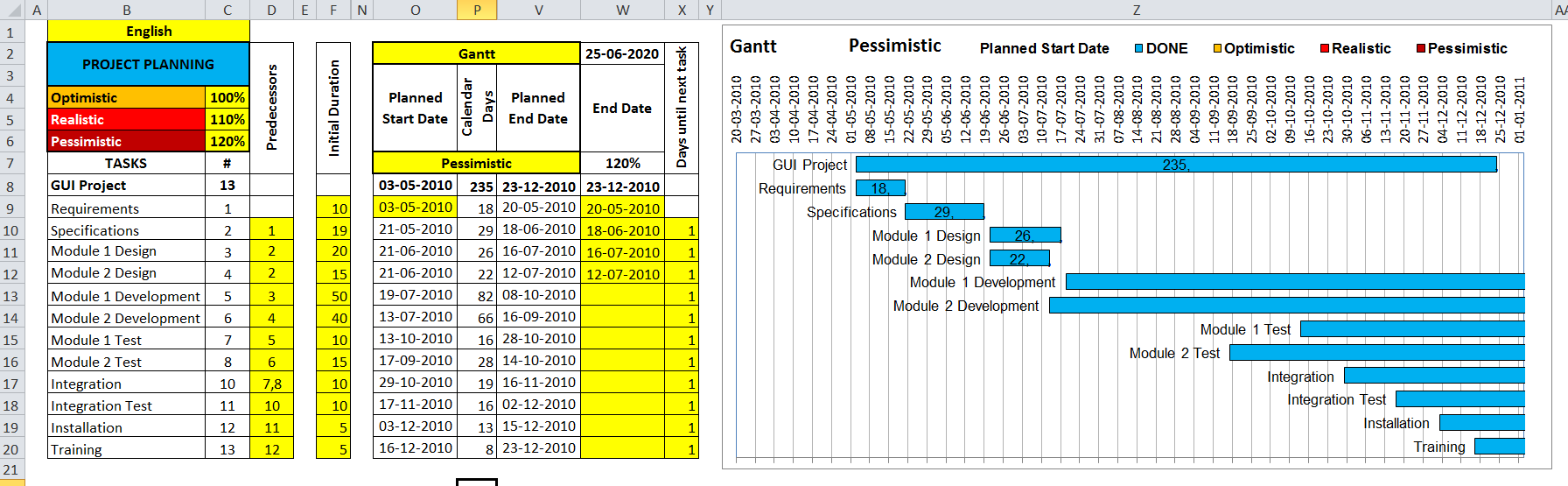
Any project should have marked targets that must be planned and divided into several tasks and, during development, do tracking to meet the deviations that occur and take appropriate decisions to have it under control.

To successfully complete a project have to meet its initial objectives (not to mention the changes that arise during the phases of the project due to changes by customers, test users, development team, project managers, potential market, etc..) and one of the main objectives is to meet the originally scheduled completion date, usually imposed by customers.

A good help is to represent the project tasks so that can change the scenarios at any time knowing what is been done and what remains to be done to allocate more or less time before there is risk to meet the objectives.

If you don't have MS Project you can use MS Excel to build a Gantt Chart with many of its features if you read this topic and begin this September with good intentions and projects.


The Gantt Charts usually don't consider anything more than a scenario but this provides 3 scenarios or possible cases:
  • Optimistic (best case): with optimal time of shorter duration historic of tasks.
  • Realistic (scheduled case): with the modal duration time of greater historical frequency of tasks.
  • Pessimistic (worst case): with the worst time, that is the longest historical duration of tasks.
Besides, of course, being able to change the names of tasks, cells that can be modified are marked with yellow background color:
C4 - Percent for the optimistic scenario.
C5 - Percentage for the realistic scenario.
C6 - Percent for the pessimistic scenario.
O9 - Scheduled starting date of the project.
F9 a F20 - Initial duration of each task scheduled on weekdays.
W9 a W20 - Actual dates of completion of tasks.
X9 a X20 - Days to be added at the end of a task to start the next task.
D10 a D20 - Predecessor tasks of each task, separated by commas.

The different scenarios of the Gantt Chart are selected through dropdown list in the next cells:
O2 - Gantt o Scenarios of the Gantt Chart.
O7 - Optimistic, Realistic and Pessimistic with the 3 possible scenarios.

This model has been inspired by an idea of Chandoo: Gantt Box Chart Tutorial

Download from this post the file with my proposal version in Excel:
Gantt Chart with risk scenarios | #ExcelPedroWave

Traducción al español aquí.

Frequent calculation bugs

Every day occurs calculation bugs in our work and personal life, often without meaning and worse without being aware of their frequency.

I am not referring to errors in measurement (I leave to mechanical engineers, their calibers, their calibration and their CAD tools), but mathematical calculation errors in a formula or computer with exact solution. That is, the glaring errors!

The measurement of error calculations is based on the theory of errors and the Gaussian statistical distribution, with formulas like these:


that, you see, are edited in Excel 2010 through powerful equation tools, with the formulas for calculating errors:
(1) The average value of the measure.
(2) The standard deviation refered to the measures of dispersion around the average value.
(3) The real value of the measure with regard to the value of the absolute error.
(4) The relative error represents the proportion of measured value that is affected by the error.

All this you know in theory if you are an engineer (even if you are a software engineer ) and if you do the development of CAD tools for design, with more reason.

During the development and testing of software we must be aware that any function or algorithm can escape our control, causing miscalculations, such as:

Software bugs are generally due to the rush to deliver a prototype, which the generated solutions are not memorized enough or the source lines of code are not documented, in order to reuse later. When faced with unfamiliar rules or algorithms, for its novelty or the most common case that there was from another software programer, is usually wrong to extrapolate the rules or steps to be skipped so that the calculations or algorithms will be correct in all situations raised or to any user input.

Examples of calculation errors in programming or known bugs:

- Erroneous forecasts in the economic calculation policy (see Merkel in Germany and Zapatero in Spain).

- The Mars Climate Orbiter crashed into the planet's surface at the end of 1999 due to an incorrect metric conversion on their computers.

- Vulnerabilities in telecommunications equipment due to software distributed to date.

- The error of the millennium or Year 2000 problem (Y2K) is a software bug or error caused by programmers and servers and PCs, omitting the years for storing dates, making the January 1, 2000 come back at 1900. The truth is that a multinational, I know well, could not resolve the problem in time and changed the calendar for its equipment, during the months it took to resolve the bug, from 2000 to 1972, which was also leap and with the same special starting on Saturday, which made equipments rejuvenate 18 years in a single New Year's Eve.

- MS Excel mistakenly assumes 1900 is a leap year.

- The floating point arithmetic in Excel 2007 is in jeopardy due to miscalculations

- The largest software company lost customer data in October 2009 because of errors in its server applications in the cloud.

- A world leader in digital security had problems in January 2010 with the recognition system of bank cards and knocked out service to millions of German users.

- If you think the list ends there, a candidate known for the near future are all computers with 32 bits UNIX operating systems, or based on the C language, because they'll stop working on January 19, 2038. It's called Year 2038 problem (Y2K38) than fall back on a journey back in time to his start on 1 January 1970.

- Collection of other software bugs here.

After this short list my dear reader will be thinking that the latest versions of the products are error free because last software projects are making better. This isn't true!, each modification involves an undetermined number of errors, and drag those who already had previous versions and generate overlap and collateral new errors.

Returning to the spreadsheet application par EXCELence. Still generates rounding errors in floating point arithmetic, for example in the formula:


which should be equal to 0 gives a value of -2.77555756156289E-17 even in the latest version of Excel 2010, please check:
How to correct rounding errors in floating-point arithmetic

And now comes the list of errors of calculation known to date in the Perpetual Calendar that I posted on this blog

1) The months of January and February 1900 are incorrect because Excel consider incorrectly the first year of their system of dates is a leap year.

2) Use the formula WEEKNUM(reference,type) incorrectly, where type is 2 to calculate the Gregorian Calendar in European countries where such is intended for countries where day 1 is included in the first week of the year, making Monday the first day of the week. In Excel 2010 you can use the type 21 that complies with ISO 8601, which says that the first week of the year is one that includes the first Thursday, so the formula is:


In Excel 2003 and 2007 can substitute by:


3) When two or more events coincide on the same day only one of them are colored by that date.

4) The algorithm for calculating the Easter Sunday, according to the Gregorian calendar for the churches of the West, is valid until the year 4099 and can not be extrapolated to 9999 (check here: Easter Algorithm for a Computer Program)

The first error is complex to solve because is internal to Excel and affects only two months of the (9999-1899) * 12 = 97,200 months can be viewed with the Perpetual Calendar.

The second error is corrected when you update and uploading new versions of the calendars.

The third error involves generating many more conditional formats of those already there, or use a range of colors that are permitted only in Excel 2010, which would still unsolved for Excel 2007.

The fourth error is significant because of the 9999-1899 = 8100 years, it fails in 9999-4099 = 5900 years, 72% of years, but there is still time to fix it...

Compiling the list of calendars published on this blog so far:


If you find any calculation error, you could comment me or shut up forever!

Further comment on methods of software quality control to minimize calculation errors. Leave "perfectionists" to completely eliminate errors.

Definition of perfectionism.
1. m. Tendency to improve work indefinitely without deciding to consider it finished.

Traducción al español aquí.

Mi lista de blogs