Traducir el blog

How to make an Excel calendar

To make it easy, I have prepared a video showing how to make a calendar in Excel. I used the latest version of Microsoft Office Excel 2010 Beta because it is free until October and is the one I have installed on my computer, but you can do it with any previous version.

It should be noted that this calendar is not as easy as those found in many pages of Excel tips because I used the logic of the date functions to represent the days optimally and easily reproducible once generated template of a particular month. It's about doing the calendar of any month, with the functions provided in Excel, changing the year and month's number to build the desired Gregorian month of any year.

IMPORTANT: The most enhanced feature that I have considered doing this calendar is that each day of the month is represented as an internal date number in Excel format, allowing you to play with the days of many possible ways, to compare them with other dates and visualized as month days (1, 2, .. 28, 29, 30, 31), days of the week (Monday, Tuesday, ..), month (January, February, ..) appearing in the language of the local configuration of the operating system of your computer.

NOTE: The representation of dates in Excel goes from number 1 by January 1, 1900, to number 2,958,465 by 31 December 9999 (Try entering 9999 as the year and 12 as the month to see what happens with the following months)

One of the improvements in 2007 and 2010 versions of Excel are the characteristics of conditional formatting, selecting the colors of the calendar, as seen in the last minutes of the video I prepared:


Except conditional formatting, the rest of the video can be followed with other computer programs such as OpenOffice Calc, that is free.
The formulas are written in English, which should not be an impediment to interpret or transform them to your language. I recommend you download the spreadsheet and open the calendar with the Office 2007 or 2010 program to see the formulas in your language. Download it with the link to the left.

If you open the calendar with Excel 2003 or earlier or OpenOffice Calc, you will not see in color because these versions do not support conditional formatting used, but is easy to add the colors you want easily.

In OpenOffice appears the 504 error in the calculation of the numbers of weeks. I leave for you to change given that the function used WEEKNUM_ADD(Date; ReturnType) designed to calculate exactly like Microsoft Excel, and not as estimated at ISO 8601, for which the function uses WEEKNUM(Number; Mode).

ATTENTION: Write the value of Mode and ReturnType to 1 (default value in Excel) or 2, depending on your calendar week starts on Sunday or Monday, respectively.

The following table shows the Excel date functions used to make the calendar:

EnglishSpanishDescription
DATE()FECHA()Calc the internal date value.
EDATE()FECHA.MES()Calc the internal date value before or after some months.
MONTH()MES()Month number of a date.
WEEKNUM()NUM.DE.SEMANA()Week number of a date.
WEEKDAY()DIASEM()Returns the day of the week as an integer (1-7).
EOMONTH()FIN.MES()Returns the last day of the month.

Don't have or want to install Excel or OpenOffice on your computer?
Well, no problem. If your PC has no memory, disk or power, you can practice for free with spreadsheets.

Where I can see and edit the calendar without download it to my PC?
The answer is in the clouds.

What are you talking about clouds?
About the Google Docs spreadsheets like this:


Click on the link below to view full screen:
How to make an Excel calendar

With what we already do not have to leave this blog to see the formulas and functions of this calendar, but suffers from the same errors mentioned for OpenOffice Calc, you can overcome if you want.

Why not create a copy of the calendar now?
Click on the menu: Archive y Create a copy...

Now you can customize your own calendar in the cloud and share it with everyone!

This has been an advance of the proposed Perpetual Calendar that you can read in future articles. If you like this, let me know posting a comment.
Traducción al español aquí.

Como hacer un calendario en Excel

Para que sea fácil, he preparado un vídeo indicando cómo hacer un calendario en Excel. He usado la última versión de Microsoft Office Excel 2010 Beta porque es gratuita hasta octubre y es la que tengo instalada en mi ordenador, pero se puede hacer con alguna versión anterior.

Se debe advertir que no es un calendario sencillo como los que se encuentran en muchas páginas de trucos para Excel sino que usa la lógica de las funciones de fechas para representar los días del mes de una forma óptima y fácilmente reproducible una vez generada la plantilla de un mes concreto. Se trata de hacer el calendario de un mes cualquiera con las funciones suministradas en Excel para que, cambiando el número del año y del mes, se pueda construir el mes gregoriano deseado de cualquier año.

IMPORTANTE: La característica más destacada que me he planteado al hacer este calendario es que cada uno de los días del mes sea representado como un número interno del formato de fechas de Excel, lo que permite jugar con los días de muchas maneras posibles, compararlas con otras fechas del calendario y representarlas gráficamente como días del mes (1, 2, .. 28, 29, 30, 31), días de la semana (lunes, martes, ..), mes del año (enero, febrero, ..) apareciendo en el idioma de la configuración regional del sistema operativo de nuestro ordenador.

NOTA: La representación de las fechas en Excel va desde el número 1, para el 1 de enero de 1900, hasta el número 2.958.465 para el 31 de diciembre de 9999 (Prueba a introducir 9999 como año y 12 como mes para ver qué pasa con los siguientes meses)

Una de las mejoras de las versiones 2007 y 2010 de Excel son las características de formato condicional, seleccionando los colores del calendario, como se puede ver en los últimos minutos del vídeo:


Excepto el formato condicional, el resto del vídeo se puede seguir con otros programas de cálculo, como OpenOffice Calc que es gratuito.
How to make a Calendar.xls
Recomiendo descargarse la hoja creada al hacer el calendario y abrirlo con el programa de Office 2007 o 2010 para poder ver las fórmulas en tu idioma. Bájatelo con el enlace de la izquierda.

Si abres el calendario con Excel 2003 o anterior o con OpenOffice Calc, no lo verás en color porque estas versiones no soportan el formato condicional usado, pero es fácil añadirle los colores que se deseen fácilmente.

En OpenOffice se produce un error 504 en el cálculo de los números de semana, lo que dejo para que lo cambies teniendo en cuenta que emplea la función WEEKNUM_ADD(Date; ReturnType) diseñada para calcularlos exactamente como lo hace Microsoft Excel, y no como se calculan en ISO 8601, para lo que emplea la función WEEKNUM(Number; Mode).

ATENCIÓN: Escribe el valor de Mode y ReturnType a 1 (valor por defecto en Excel) o 2, según la semana de tu calendario comience en domingo o en lunes, respectivamente.

La siguiente tabla muestra las funciones de fecha de Excel empleadas para hacer el calendario:

Inglés Español Descripción
DATE() FECHA() Calcula el valor interno de una fecha.
EDATE() FECHA.MES() Calcula el valor interno de una fecha antes o despues de un número de meses.
MONTH() MES() Número de mes de una fecha.
WEEKNUM() NUM.DE.SEMANA() Número de semana de una fecha.
WEEKDAY() DIASEM() Número de día de una fecha.
EOMONTH() FIN.MES() Devuelve el último día del mes.


¿Que no tienes o no quieres instalar Excel ni OpenOffice en tu ordenador?
Pues no hay problema. Si tu PC no tiene memoria, disco o potencia puedes practicar gratis con las hojas de cálculo.

¿Dónde puedo ver y editar el calendario sin bajármelo a mi PC?
La respuesta está en las nubes.

¿De qué nubes hablas?
De la nube en Microsoft OneDrive:


Con lo que ya no hace falta que salgas de este blog para ver las fórmulas y funciones de este calendario, aunque adolece de los mismos errores comentados para OpenOffice Calc y que puedes subsanar si quieres.

¿Por qué no creas ahora una copia del calendario?
Pulsa en el menú: Archivo y Crear una copia...

Ahora ya puedes modificar tu propio calendario en la nube ¡y compartirlo con todo el mundo!

Este ha sido un anticipo del proyecto de Calendario Perpetuo, que podrás leer en próximos artículos. Si te ha gustado dímelo escribiéndome un comentario.

English translation of this post here.

Strategy to project the calendar

The first thing to do in any project is to plan the strategy to be followed and the construction of a Perpetual Calendar in Excel is no exception.

Before you start chopping code, the important thing is to understand the user needs to highlight the objectives of the project. Which is not going to plan here is the time of development or project implementation, as users are anonymous, and they will look for the results of this project in this blog when it's finished and not before. This is true in the era of Internet and its search engines, the premise is that it seeks what now exists, at this time and not something that is coming in the near or distant future.

If I hadn't proposed this project, nobody would have missed and who would have looked something like this would have satisfied for what was now finding, so the first thing I did was look for other existing calendar projects, and that an important part strategy is the current and potential market analysis.

The calendars are present in any computer application, but we will focus on serving to calculate the months of any year or multi-year.

Since immemorial time humans have created and used many types of calendars to remember and to plan their daily activities: solar, lunar, lunisolar, aztec, maya, egyptian, islamic, hebrew, chinese, buddhist, holidays, academic, anniversaries, product or space rocket launch, etc.

You can use some alternative calendars en Excel as the Hijri (lunar Islamic countries) or the Buddhist, although mainly used in the world today is the Gregorian calendar, with the peculiarity that is longer than the Tropic of Cancer, with a lag of about three days every 10,000 years. In this calendar, week is 7 days and one day is 24 hours x 60 minutes x 60 seconds = 86,400 seconds. Common years are of 365 days, the leap years of 366 days and the secular years multiples of 100 are leap years if they are multiples of 400, so that the average Gregorian year is 365.2425 days. One cycle of the Gregorian calendar of 400 years has exactly 20,871 weeks.

The ISO 8601 standard for representation of dates and times standard is based on the Gregorian calendar.

Monday is the first day of the week, except for Christian and Jewish religions and the United States that is Sunday.

Where do we find Gregorian calendars? Anywhere. Hanging on the wall, at our desk, in the newspapers, teletext on TV, calculators, computers, cell phones, etc., not to mention digital watches.

We will focus on the calendars we find in other applications, such as calendars, planners and organizers, advertising and similar to Outlook calendar, which serve to create appointments, events, meetings, parties know the local, national and global week labor, etc., but more often are out of our computer, uploaded to the cloud... We will focus on the calendars you find in other applications, such as calendars, planners and organizers, advertising and similar to the Outlook calendar, which serve to create appointments, events, meetings, parties know the local, national and global work week, etc., but more often are out of our computer, uploaded to the cloud...

I do not mean ash clouds that make the European aircrafts can stay on land, for no one knows how many days a year, but the cloud of data servers that support all types of applications, including:

Microsoft Windows Live Calendar: Free to create calendars and share them with friends or post online.

Google Calendar: A free online calendar that can be shared "at one place" in its propaganda, but I fear that is spread by multiple servers.

I left here an example with the posting dates in this blog that can be embedded on any web page like this:

On the Web there are many other calendars you can view and customize like this:
The www.timeanddate.com Calendar Generator
Enter year:

The next article will be a preview of how to make a perpetual calendar in Excel, and why not, in the clouds or is that not part of the water cycle?
Traducción al español aquí.

Estrategia para proyectar el calendario

Lo primero que hay que hacer en cualquier proyecto es planificar la estrategia a seguir y la construcción de un Calendario Perpetuo en Excel no es una excepción.

Antes de ponerse a picar código, lo importante es conocer las necesidades de los usuarios para marcar los objetivos del proyecto, lo que no se va a planificar aquí es el tiempo de desarrollo o ejecución del proyecto, ya que los usuarios son anónimos y buscarán el resultado de este proyecto en este blog cuando esté acabado y nunca antes. Esto es así en la era de Internet y de sus buscadores, la premisa es que se busca lo que hay ahora, en este momento y no algo que está por venir en un futuro próximo o lejano.

Si no me hubiera propuesto realizar este proyecto, nadie lo hubiera echado de menos y quien hubiera buscado algo similar se habría conformado con lo que encontrara entonces, por lo que lo primero que hice fue buscar otros proyectos existentes de calendarios, ya que una parte importante de la estrategia es el análisis del mercado actual y del mercado potencial.

Los calendarios están presentes en cualquier aplicación informática, pero nos centraremos en los que sirvan para calcular los meses de cualquier año o plurianuales.

Desde tiempo inmemorial los humanos hemos creado y usado múltiples tipos de calendarios para recordar y planificar nuestras actividades diarias: solares, lunares, lunisolares, aztecas, mayas, egipcios, musulmanes, hebreos, chinos, budistas, laborales, escolares, de aniversarios, de lanzamiento de productos o de cohetes espaciales, etc.

Se pueden usar algunos calendarios alternativos en Excel como el Hijri o Hégira (calendario lunar de los países islámicos) o el budista, aunque el mayoritariamente empleado en el mundo actualmente es el calendario gregoriano, con la peculiaridad de que es más largo que el Trópico de Cáncer, con un desfase de unos 3 días cada 10.000 años. En este calendario, una semana son 7 días y un día son 24 horas x 60 minutos x 60 segundos = 86.400 segundos. Los años comunes son de 365 días, los bisiestos de 366 días y los seculares múltiplos de 100 son bisiestos si son múltiplos de 400, por lo que la duración media del año gregoriano es de 365,2425 días. Un ciclo del calendario gregoriano de 400 años consta exactamente de 20.871 semanas.

La norma ISO 8601, para la representación de fechas y horas estándar, se basa en el calendario gregoriano.

El lunes es el primer día de la semana excepto para las religiones cristiana y judía que es el domingo, como en Estados Unidos.

¿Dónde nos encontramos calendarios gregorianos? En cualquier parte. Colgados en la pared, en nuestro escritorio, en los periódicos, en el teletexto de la tele, en la calculadora, en el ordenador, en el móvil, etc., sin olvidar a los relojes digitales.

Nos concentraremos en los calendarios que encontramos en otras aplicaciones informáticas, como agendas, planificadores y organizadores, publicitarios y otros similares al calendario de Outlook, que sirven para crear citas, eventos, organizar reuniones, saber las fiestas locales, nacionales y mundiales, la semana laboral, etc., pero cada vez más a menudo están fuera de nuestro ordenador, subidos a la nube...

No me refiero a las nubes de ceniza que hacen que los aviones europeos se puedan quedar en tierra, durante no se sabe cuántos días al año, sino de la nube de servidores de datos que soportan todo tipo de aplicaciones, como:

Microsoft Windows Live Calendario: Gratuito para crear calendarios y compartirlos con amigos o publicarlos en línea.

Google Calendar: Un servicio gratuito de calendario en línea que se puede compartir "desde un único lugar" según su propaganda, aunque me temo que esté distribuido por múltiples servidores.

He colgado a la derecha un ejemplo con las fechas de publicación de los artículos de este blog que se puede incrustar en cualquier página web como ésta:


En la Web hay muchos otros calendarios que se pueden ver y personalizar como éste:
El Generador de Calendarios www.timeanddate.com
Introducir un año:

El próximo artículo será un adelanto de como hacer un Calendario Perpetuo en Excel y, por qué no, en las nubes ¿o es que no son parte del ciclo del agua?
English translation of this post here.

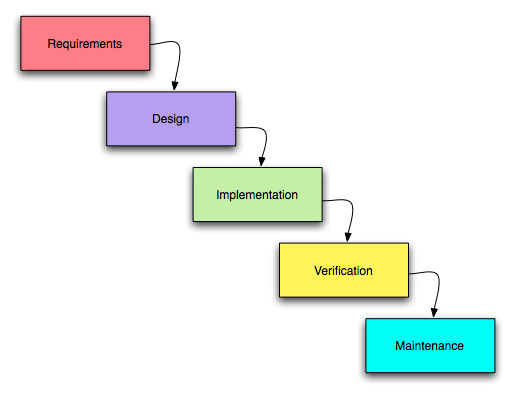
The old Waterfall Model versus Man-Month

Software development is the act or art of working to produce or create software. The main purpose is to meet some needs of potential users.

Software development is also the process of writing and maintaining source code including research, design, implementation, modification, re-engineering, verification, maintenance, software documentation, etc.

As I come from industrial engineering, when I started working at software engineering I liked the waterfall development model that had its roots in manufacturing and construction industries, in which subsequent changes were costly, so that the processes previous design had to be very precise and error free.

First phases in the software development process involve departments as marketing, engineering, R&D and general management but normaly they are not involved sufficiently in the requirements specification early in the process of project development, so that the needs of customers or end-users are not well-defined by the first time.

The waterfall model is easy to understand because it is a sequential model, but requires that development processes are rigorous as in the case of the building architecture and this doesn't usually happen in software architecture.

For this reason you can not pass from one process to another as in a waterfall, unable to turn back because the software application programs tend to be adapted throughout all their life cycle to satisfy the user needs, involving the customer as much as possible, and should be easy to modify as a smart building.

The book The Mythical Man-Month shows us the software engineering problems, spelling out the difficulties of software development, principally:
1) Adding manpower to a late software project makes it later (man-month increases!)
2) After users use our software application, when they know what want.

As there is always a deadline and changes are finite, otherwise the development can not be completed, and there arises the need for software releases life cycle.

A good software code is constantly changing to make sure we end up with the simplest, and best possible application that reflects the current needs of the user.

To my project of knowing how to make a Perpetual Calendar, I won't add man-months more than mine for not making it a perpetual development.

Thanks for your attention.
Traducción al español aquí.
El viejo Modelo de Desarrollo en Cascada versus Meses-Hombre

El desarrollo del software es el acto o arte de trabajar para producir o crear software. El objetivo principal es satisfacer algunas necesidades de los usuarios potenciales.

El desarrollo de software es también el proceso de escribir y mantener código, incluida la investigación, diseño, implementación, modificación del fuente, reingeniería,verificación, mantenimiento, documentación de software, etc.


Como provengo de la ingeniería industrial, cuando empecé a trabajar en la ingeniería de software me gustaba el modelo de desarrollo en cascada que tiene sus raíces en las industrias manufacturera y de la construcción, en las que los cambios posteriores son muy costosos, por lo que los procesos iniciales de diseño deben ser muy precisos y libres de errores.

Las primeras fases en el proceso de desarrollo de software implican a departamentos como marketing, ingeniería, I+D y gestión general, pero normalmente no participan lo suficiente en la especificación de requerimientos al principio del proceso de desarrollo del proyecto, de modo que las necesidades de los clientes o usuarios finales no son bien definidas al principio.

El modelo en cascada es fácil de entender porque es un modelo secuencial, pero requiere que los procesos de desarrollo sean tan rigurosos como en el caso de la arquitectura de edificios y esto no suele ocurrir en la arquitectura de software.

Por esta razón no se puede pasar de un proceso a otro, como en una cascada incapaz de dar marcha atrás, porque los programas de aplicación de software tienden a ser adaptados durante todo su ciclo de vida para satisfacer las necesidades de los usuarios, con la participación del cliente tanto como sea posible, y deben ser fáciles de modificar como lo debe ser un edificio inteligente.

El libro The Mythical Man-Month nos muestra los problemas de ingeniería de software, explicando claramente las dificultades de desarrollo de software, principalmente:

1) Añadir personal a un proyecto retrasado lo demorará aún más (¡aumentan los meses-hombre!)

2) Después de que los usuarios usen nuestro software de aplicación es cuando saben lo que quieren.


Como siempre hay una fecha límite y los cambios son finitos, si no el desarrollo no puede llevarse a cabo, surge la necesidad de las versiones en el ciclo de vida del software.

Un buen código de software debe estar cambiando constantemente para asegurar que se consigue la más simple y mejor aplicación posible que refleje las necesidades actuales del usuario.

Para mi proyecto de saber cómo hacer un Calendario Perpetuo, no añadiré más meses-hombre que los míos para no convertirlo en un desarrollo perpetuo.

Gracias por tu atención.
English translation of this post here.

Planning the months of the year

In many computer applications users will see dates, order dates, clients or bosses orders, of the upcoming campaign advertising, purchase orders, the milestones of a project, the balance sheet dates, staff dates, etc.., so it is important a good representation of dates and its relation to the calendar, holidays, important events, the work schedule and many other matters with which we have to deal in a day-to-day business life.

To demonstrate the visual importance of the dates I plan to do a perpetual calendar in Excel that it'll be useful, used to play with the dates in a practical way that can be applied to many other user-oriented design applications, so should be easy to use and easy to understand for the user, even without having a manual at your fingertips, but internally could be complex.

For any application that we propose, is necessary to know first what are searching the user when make use of it, for what we should do a list of its main features pursuing the objective of achieving a good user experience that motivates him to use our application at any time and that his desire is large enough to use it many times.

Before planning a commitment dates of starting and ending, we will start thinking about our project as an abstract object to begin to take shape later, according to the theory of the five levels used to study the user experience, breaking the design decisions into 5 elements to improve the user experience (the 5'S) that are easier to develop:

Strategy - You have to know the habits of your users, through analysis, surveys and market studies, because inspiration speaks to their interests rather than the interests of designers, and from that knowledge, develop brilliant ideas that meet that goal.

Scope - The characteristics and features built into our application defined its scope. The more functional specifications, the more ambitious will be the requirements of the project.

Structure - Defines where and how users will interact with the application and its architecture, providing information on the interaction with the design.

Skeleton - The place of user interface elements will be determined by the skeleton will be designed to optimize its use, being effective and efficient for the desired objective.

Surface - The result that you see on the surface of the visual design of the application which interacts to get the results wanted by the user. Having been designed much better 5 levels, the better your experience as a site or application user and pay more to buy and like it!

In the next posts I will explain each of these levels in the development of a Perpetual Calendar designed in Excel spreadsheets but, above all, remember that planning before doing, to have conscious reasons in making decisions, expressing clearly and explicitly and do things thinking about end-users.

The following presentation explains visually the elements of the user experience on our project:

The visual design is just the iceberg tip, but that is what the user sees.
Traducción al español aquí.

Planificando los meses del año

En muchas aplicaciones informáticas los usuarios ven fechas, de los pedidos, de los encargos de sus clientes o jefes, de la próxima campaña de publicidad, de las órdenes de compra, de los hitos clave de un proyecto, del cierre del balance, de las altas y bajas del personal, etc., por lo que es importante una buena representación de las fechas y su relación con la agenda, los días de fiesta, los eventos importantes, el calendario laboral y otros muchos asuntos con los que tenemos que lidiar en el día a día de la empresa.

Para demostrar la importancia visual de las fechas me he propuesto hacer un calendario perpetuo en Excel que sea útil, que sirva para jugar con las fechas de un modo práctico y que se pueda aplicar a otras muchas aplicaciones de diseño orientado al usuario, por lo que debe ser fácil de usar y fácil de entender por el usuario, incluso sin que tenga un manual a su alcance, aunque internamente sea complejo.

Para cualquier aplicación que nos propongamos, lo primero es saber que va a buscar el usuario al hacer uso de ella, para lo que debemos hacer una lista de sus características principales que persigan el fin de conseguir una buena experiencia del usuario que lo motive a usar nuestra aplicación siempre que lo desee y que su deseo sea suficientemente grande para usarla muchas veces.

Antes de planificar unas fechas de compromiso de comienzo y finalización, comenzaremos pensando en nuestro proyecto como algo abstracto para ir concretándolo más adelante, según la teoría de los cinco niveles que sirve para estudiar la experiencia de los usuarios, desmenuzando la toma de decisiones de diseño en 5 elementos para mejorar la experiencia del usuario que son más fáciles de desarrollar:

Estrategia - Hay que conocer las costumbres de nuestros usuarios, mediante análisis, encuestas y estudios de mercado para que la inspiración se dirija a sus intereses en lugar de a los intereses de los diseñadores y, a partir de ese conocimiento, elaborar ideas brillantes que cumplan ese objetivo.

Alcance - Las características y funciones incorporadas en nuestra aplicación definen su alcance. Cuantas más especificaciones funcionales haya, más ambiciosos serán los requisitos del proyecto.

Estructura - Define cómo y dónde van a interactuar los usuarios con la aplicación y su arquitectura, proporcionando información sobre la interacción con el diseño.

Esquema - El lugar que ocupan los elementos del interfaz de usuario estará determinado por el esquema que será diseñado para optimizar su uso, siendo efectivo y eficiente para el objetivo deseado.

Superficie - El resultado que ve el usuario está en la superficie del diseño visual de la aplicación con la que interactua para obtener los resultados que busca. Cuánto mejor se hayan diseñado los 5 niveles, mejor será su experiencia como usuario del sitio o de la aplicación ¡y la comprará y pagará más a gusto!

En las próximas entregas se explicarán cada uno de estos niveles en el desarrollo de un Calendario Perpetuo diseñado en hojas de cálculo Excel pero, sobre todo, hay que recordar que se debe planificar antes de hacer, tener razones conscientes en la toma de decisiones, expresarlas clara y explícitamente y hacer cosas que le gusten al usuario final.

La siguiente presentación explica visualmente los elementos de la experiencia del usuario sobre nuestro proyecto:
El diseño visual es sólo la punta del iceberg, pero es lo que percibe el usuario.
English translation of this post here.

Mi lista de blogs